Tuesday, July 1, 2014

हड्डी मजबुत बनाउने खानेकुराहरु

हड्डी मजबुत बनाउने खानेकुराहरु

२०७१ असार ११ गते १९:०५ मा प्रकाशित बानियाँ राजन
   
  
क्याल्सियम तथा भिटामिन डी जस्ता पोषण तत्व स्वस्थ हड्डीका लागि अनिवार्य तत्व हुन् । क्याल्सियमले हड्डी तथा दाँतलाई मजबुत बनाउँछ भने भिटामिन डी ले क्याल्सियम सोस्ने क्षमतामा वृद्धि गर्नुका साथै हड्डीको वृद्धिमा सघाउ पूराउँछ ।
healthy-bones
हड्डीको रोग ओस्टीयोपोरोसिसको मुख्य कारण भिटामिन डी को कमी नै हो । त्यसैले हड्डीलाई स्वस्थ र मजबुत बनाउन हाम्रो खानामा भिटामीन डी र क्याल्सियम प्रसस्त पाइने खानाहरु अनिवार्य रुपमा समावेश हुनुपर्छ । हड्डी मजबुत बनाउन खानैपर्ने केही खानेकुरा यी हुन् :
· दुध - दुधमा प्रसस्त मात्रामा क्याल्सियम पाइनुका साथै भिटामीन डी पनि पाइन्छ । दिनको एक गिलास दुध पिउनु हड्डीको मजबुतीका लागि महत्वपूर्ण हुने विज्ञहरु बताउँछन् । दुधका साथै दही, मही तथा चिजको सेवन पनि नियमित गर्नु राम्रो हुन्छ ।
· केरा- हड्डीको स्वास्थ्यका लागि केरा निकै लाभदायी फल हो । केरामा प्रसस्त मात्रामा क्याल्सियमका साथै पोटासियम लवण पाइन्छ । यसले सरीरको रोग प्रतिरोधी क्षमता बढाउनुका साथै प्रोटिनको सस्लेषण बढाउने र सरीरबाट क्याल्सियम क्षय हुने दर घटाउँछ ।
· हरियो सागपात - हरियो सागपात तथा कोसे तरकारीहरुमा पर्याप्त क्याल्सियमका साथै भिटामिन समेत पाइन्छ । यस्ता सागपात र तरकारीले हड्डीमा लवणहरुको घनत्व बढाउँछ ।
· बदाम - बदाम, ओखर जस्ता खानेकुराहरुमा प्रसस्त मात्रामा क्याल्सियम र पोटासियम पाइन्छ । साथै यस्ता खानेकुरामा उपयोगी फ्याट्टी एसिड पनि पाइन्छ जसले हड्डीको क्षयिकरण रोक्न मद्दत गर्छन् र हड्डीको निर्माणमा सघाउ पूराउँछन् ।
· माछा, मासु र अण्डा पनि हड्डी स्वस्थ राख्न खानुपर्ने महत्वपूर्ण खानेकुराहरु हुन् । यसले हड्डीलाई मजबुत बनाउनुका साथै हड्डीको विकाशमा समेत सहयोग पूराउँछ ।
- See more at: http://www.onlinekhabar.com/2014/06/163314/#sthash.2oYyyAji.dpuf

संसारका सुन्दर शहरलाई आकाशबाट हेर्दा (फोटोफिचर)

संसारका सुन्दर शहरलाई आकाशबाट हेर्दा (फोटोफिचर)

२०७१ असार १७ गते १०:४८ मा प्रकाशित बानियाँ राजान
बर्डस् आइज भिउ अर्थात् माथि आकाशबाट देखिने कुनैपनि वस्तु तथा ठाउँको विहंगम दृश्य, जसलाई आकाशे दृश्य पनि भन्न सकिन्छ । जमिनबाट पूरै दृश्य देख्न नसकिने ठाउँ तथा वस्तुहरुको आकाशे दृश्य साँच्चीकै सुन्दर हुन्छ । आकाशे दृश्यमा विश्वका ठूला ठूला सहरहरुको झलक कस्तो होला ? जहाज चढेको बेला तल देखिने दृश्य जस्तै, तर अझ प्रष्ट । विश्वका नामी सहरहरुको चराआँखे दृश्य हेर्ने चाहना छ ? हामीले इन्टरनेटबाट खोजिनीति गरेर विश्वका केही चर्चित सहरहरुको विहंगम आकाशे दृश्य यहाँ प्रस्तुत गरेका छौँ :
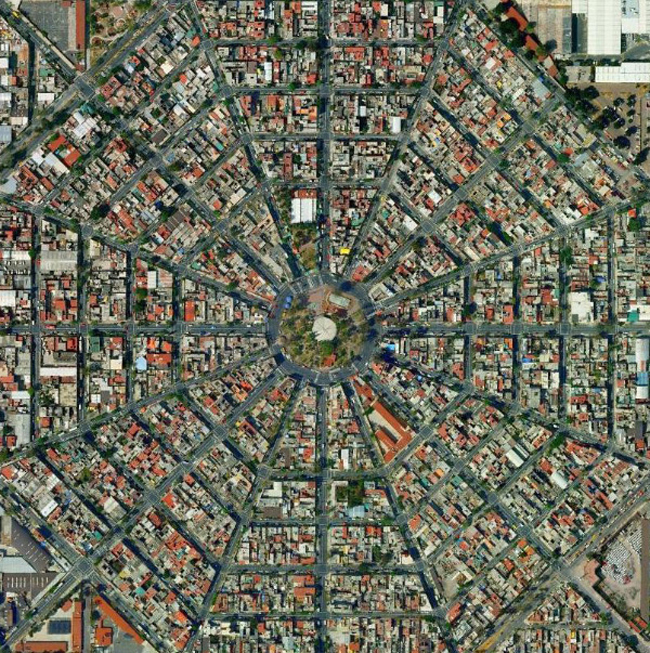
mexico-cityमेक्सिको सिटी टेक्सकोको तालको टापुमा सन् १३२५ मा मेक्सिको सहरको स्थापना भएको हो । यसको आकाशे दृश्य साँच्ची फूल आकारकै छ ।
giza-pyramids-egypt
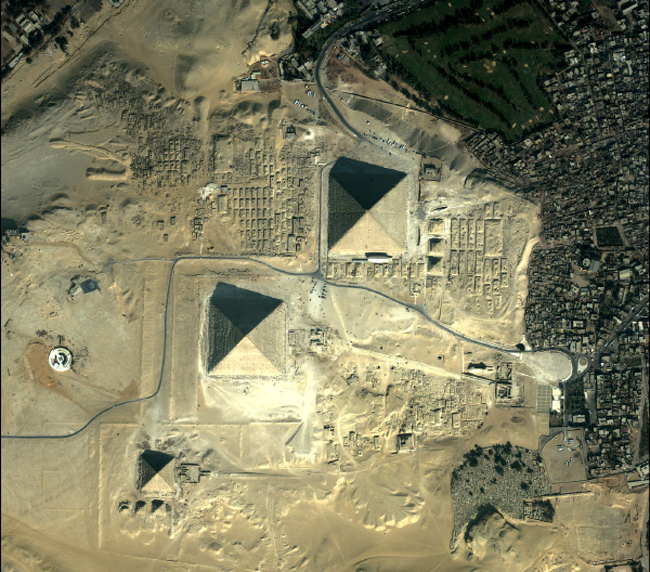
गिजा: इजिप्टको नाइल नदीस्थित किनारामा रहेको गिजा सहरको मुख्य आकर्षण भनेकै विश्वकै आश्चर्यको रुपमा रहेको गिजाको पिरामिड नै हो ।
sun-city-arizona-usa
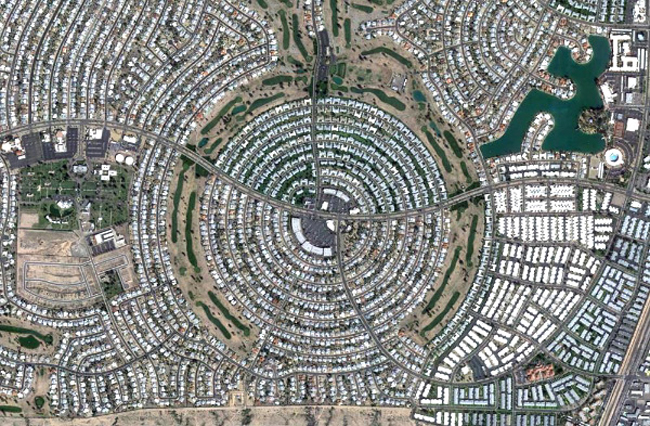
सनसिटी: अमेरिकाको सनसिटीको आकाशे दृश्य साँच्चीकै मनमोहक छ । यसका सामुदायिक सडक अधिकांस वृत्ताकार छन् ।
barcelona-spain
बार्सिलोना: स्पेनको बार्सिलोना युरोपको छैटौँ बढि जनसंख्या भएकेा सहर हो । यसका कासा बाटलो तथा ला प्रेडरेरा जस्ता भवन निकै चर्चित छन् ।
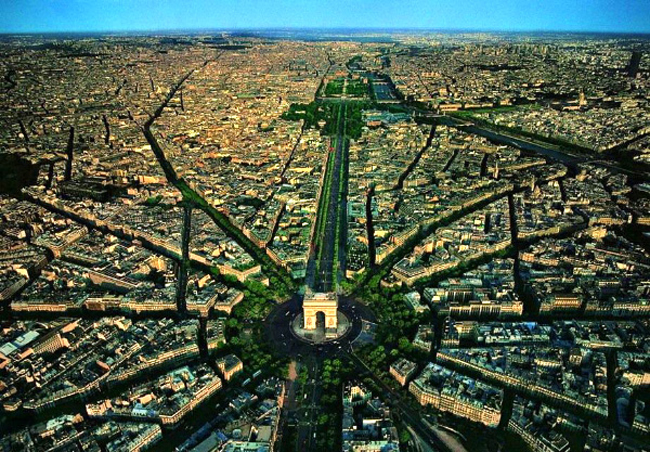
paris-franceपेरिस:  इफेल टावर तथा आर्क ट्रायोम्फ जस्ता चर्चित वास्तुकला रहेको पेरिसको हवाइ दृश्य निकै मनमोहक छ ।
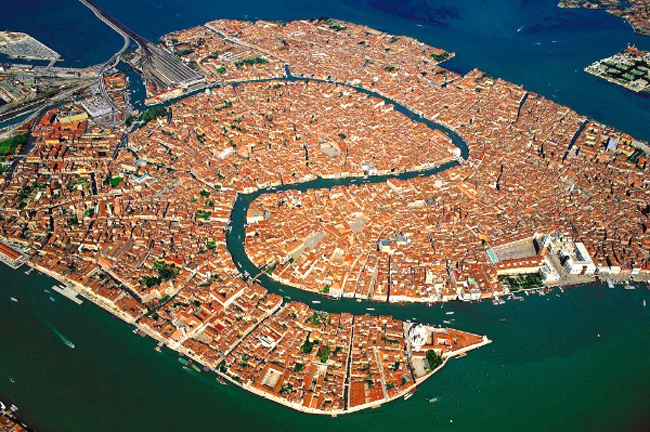
venice-italyभेनिस : इटालीको भेनिस सामुदि्रक मुगा टापुमा अवस्थित छ । यो सुन्दर कला तथा वास्तुका कारण चर्चित छ । यो पूरै सहर विश्व सम्पदा सूचिमा सूचिकृत छ ।
shanghai-china
 सांघाइ : चीनको सांघाइ सबैभन्दा धेरै जनसंख्या भएको चिनिया सहर हो ।
male-maldives2माले : माल्दिभ्सको राजधानी सहर माले विश्वको पाँचौँ बढि जनघनत्व भएको टापु हो ।

Friday, October 25, 2013

कम्प्युटर ढिलो खुलेर हैरान हुनुभएको छ? तपाइँको कम्प्युटर खुल्न धेरै समय लगाउँछ भने तपाइँलाई कम्प्युटर चलाउन नै हैरान लाग्छ। कम्प्युटरमा हामीले राखेका विभिन्न सफ्टवेयरहरु पनि कम्प्युटरसँगै खुल्ने हुँदा कम्प्युटर सुरुमा खुल्नको लागि समय लिने हो। किनभने
हामीले कम्प्युटरमा विभिन्न सफ्टवेयरहरु इन्स्टल गर्दा खासै ध्यान नदिइ अघिल्लो अघिल्लो स्टेपमा गइरहेका हुन्छौं। विभिन्न सफ्टवेयरको इन्स्टल गर्दाको डिफल्ट सेटिङ कम्प्युटरसँगै खुल्ने भन्ने हुन्छ। त्यसले गर्दा कम्प्युटरको अपरेटिङ सिस्टम खुल्नासाथ क्रमैसँग त्यस्ता सफ्टवेयरहरु खुल्न थाल्छन्। जसले गर्दा कम्प्युटरको स्वीच अन गरेपछि तपाइँले चलाउनका लागि तयार बन्नका लागि कम्प्युटरले समय लिन्छ।
तपाइँ आफ्नो कम्प्युटरलाई यी पाँच तरिका अपनाएर छिटो बनाउन सक्नुहुन्छ
Speed up your computer start upतर यसखालको खुल्नमा हुने ढिलाइलाई कम गराएर छिटो कम्प्युटर खुल्ने बनाउन पनि सकिन्छ। त्यसका लागि तपाइँले कम्प्युटरसँगै खुल्ने सेटिङ भएका सफ्टवेयरहरुलाई कम्प्युटरसँगै नखुल्ने बनाउन सक्नुहुन्छ। यसले गर्दा कम्प्युटर अन हुनासाथ सबै सफ्टवेयरहरु खुल्दैनन्। तपाइँलाई कम्प्युटर खुल्नासाथ सबै खालका सफ्टवेयर एकै पटक चाहिने पनि होइन। आफूलाई चाहिएको समयमा खोल्न सकिने भएकाले त्यस्ता सफ्टवेयरलाई कम्प्युटरसँगै खुल्ने नबनाउने हो भने तपाइँको कम्प्युटर छिटो खुल्ने बन्छ।
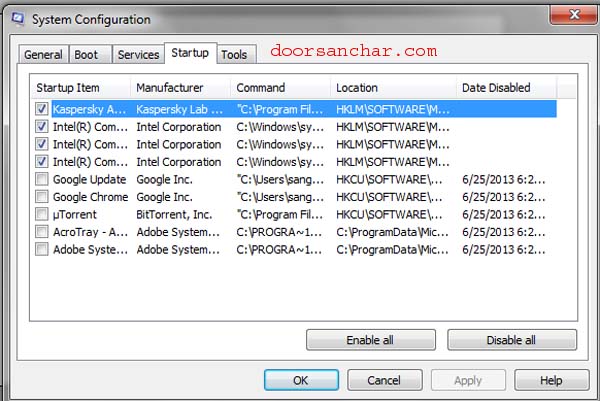
त्यसका लागि तपाइँले वीण्डोज सेभेन तथा ऐटमा वीण्डोजको स्र्टार्ट मेनुमा गएर त्यहाँ रहेको खोजी बक्समा RUN टाइप गर्नुपर्छ। त्यसपछि देखिने RUN मा क्लिक गरेपछि देखिने रन बक्समा msconfig टाइप गरेर इन्टर वा ओके गर्नुपर्छ। यति गरेपछि देखिने (माथिको तस्विरको जस्तो) वीण्डोमा स्टार्टअप लेखेको ट्याबमा गएर त्यहाँ देखिएका सफ्टवेयरमा रहेको ठीक चिन्हलाई हटाइ दिनुपर्छ। यसरी ठीक चिन्ह हटाउँदा आफूले चिनेका सफ्टवेयर जस्तै स्काइप, भाइबर, क्रोम, एडोब एजेन्ट लगायतलाई मात्र हटाउनु पर्छ। तपाइँले नचिनेका सफ्टवेयर वा प्रोग्राममा भएका ठीक चिन्ह भने नहटाउनु होला। यसरी ठीक चिन्ह हटाउँदा एन्टीभाइरस सफ्टवेयरमा रहेको ठीक चिन्ह भने हटाउनु हुँदैन।
यदी तपाइँ वीण्डोज एक्सपी चलाउनुहुन्छ भने सिधै स्र्टार्ट मेनुमा रहेको रनमा गएर msconfig टाइप गरेर अघि जान सक्नुहुन्छ।
यति गरेपछि कम्प्युटरले रिस्टार्ट माग्छ। र तपाइँले रिस्टार्ट गरेपछि कम्प्युटर छिटो खुल्छ।

छिटो खुल्ने बनाऔं कम्प्युटर

कम्प्युटर प्रयोग गर्नेहरुलाई कम्प्युटर सुस्तो खुलेर र ढिलो बन्द भएर हैरान बनाएको हुन्छ। तपाइँले दैनिक नै कम्प्युटर ढिलो बन्द भएका कारण घर वा कार्यालयबाट निस्कन ढिलाइ भोग्नुभएको होला। कम्प्युटरको अपरेटिङ सिस्टम बन्द हुनका लागि केही समय लागिहाल्छ। त्यो तपाइँ हामीलाई हतार भएको बेलामा निक्कै लामो लागिरहेको हुन्छ।
त्यसैले कतिपयले कम्प्युटरलाई छिटो बन्द गराउनका लागि फोर्स सटडाउन जस्ता सफ्टवेयर पनि हालेका हुन्छन्। तर, सफ्टवेयर राखेर छिटो कम्प्युटर बन्द गराउनु भन्दा सजिलो र भरपर्दो उपाय पनि छ। जसले तपाइँको कम्प्युटर तपाइँले चाहे जसरी नै छिटो बन्द हुने बनाउँछ। त्यसका लागि कुनै सफ्टवेयरको आवश्यकता पनि पर्दैन अनि कम्प्युटरको पावर बटन दबाउन वा तार फुस्काउन पनि पर्दैन। त्यसका लागि सानो उपाय मात्र लगाए हुन्छ।
01 speed up your computer's shutdown process fast shutdown your computer
तपाइँले आफ्नो कम्प्युटरलाई छिटो बन्द गराउन चाहनुहुन्छ भने कम्प्युटरको रजिष्ट्रीमा सानो परिवर्तन गरे मात्र हुन्छ। (यसखालको परिवर्तन गर्दा सामान्यतया कम्प्युटरमा खराबी नआउने भएपनि रजिष्ट्री फाइल ब्याकअप गर्न तथा सावधानी अपनाउन अनुरोध गरिन्छ)
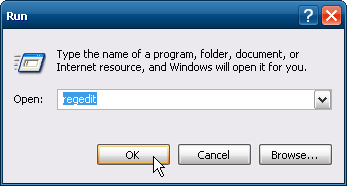
त्यसका लागि तपाइँ आफ्नो कम्प्युटरको स्टार्ट बटनमा क्लिक गर्नुहोस्। त्यसमा रहेको RUN मा क्लिक गरेर regedit टाइप गर्नुहोस्। त्यसपछि ओके वा इन्टर गर्नुहोस्। त्यसपछि देखिने Registry Editor वीण्डोमा त्यसपछि HKEY_CURRENT_USER मा त्यसपछि Control Panel र Desktop मा क्लिक गर्नुहोस्। Desktop मा क्लिक गरेपछि तपाइँले दायाँ तर्फो बक्समा WaitToKillServiceTimeout लेखेको फाइल देख्नुहुन्छ। त्यसलाई दायाँ क्लिक गरेर Modify मा क्लिक गर्नुहोस्।
speed up your computer's shutdown process fast shutdown your computer
यसरी क्लिक गरेपछि WaitToKillServiceTimeout लेखेको एउटा बक्स वीण्डो देखिन्छ जसमा भ्यालुमा कुनै अंक लेखिएको पाउनुहुनेछ। त्यसलाई परिवर्तन गरेर १००० भ्यालु राख्नुहोस् र OK मा क्लिक गरेर छोड्नुहोस्।
यती गरिसकेपछि तपाइँको कम्प्युटर पहिले भन्दा धेरै छिटो बन्द भएको अनुभव गर्नुहुनेछ।
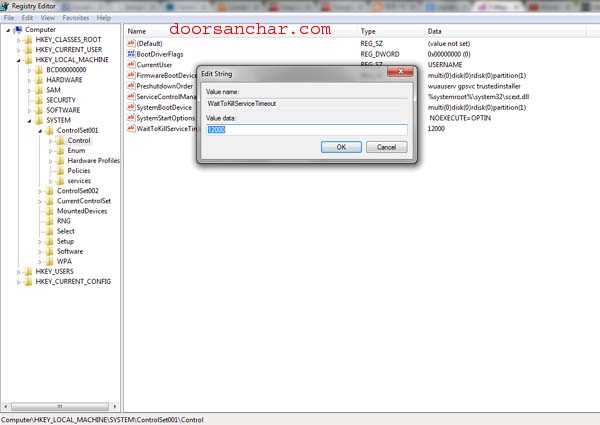
वीण्डोज सेभेन चलाउनुहुन्छ भने रजिस्ट्री एडिटरमा गएपछि HKEY_LOCAL_MACHINE त्यसपछि SYSTEM त्यसपछि CurrentControlSet त्यसपछि Control मा गएर WaitToKillServiceTimeoutलेखिएको फाइल पाउनुहुन्छ। त्यसमा क्लिक गर्दा आउने WaitToKillServiceTimeout लेखिएको वीण्डोमा रहेको भ्यालु डाटा भन्ने अप्समा देखिने १२००० लाई २००० मा परिवर्तन गरेर ओके गर्नुभयो भने तपाइँको कम्प्युटर छिटो बन्द हुन्छ।

यसरी छिटो बन्द हुन्छ कम्प्युटर

कम्प्युटर प्रयोग गर्नेहरुलाई कम्प्युटर सुस्तो खुलेर र ढिलो बन्द भएर हैरान बनाएको हुन्छ। तपाइँले दैनिक नै कम्प्युटर ढिलो बन्द भएका कारण घर वा कार्यालयबाट निस्कन ढिलाइ भोग्नुभएको होला। कम्प्युटरको अपरेटिङ सिस्टम बन्द हुनका लागि केही समय लागिहाल्छ। त्यो तपाइँ हामीलाई हतार भएको बेलामा निक्कै लामो लागिरहेको हुन्छ।
त्यसैले कतिपयले कम्प्युटरलाई छिटो बन्द गराउनका लागि फोर्स सटडाउन जस्ता सफ्टवेयर पनि हालेका हुन्छन्। तर, सफ्टवेयर राखेर छिटो कम्प्युटर बन्द गराउनु भन्दा सजिलो र भरपर्दो उपाय पनि छ। जसले तपाइँको कम्प्युटर तपाइँले चाहे जसरी नै छिटो बन्द हुने बनाउँछ। त्यसका लागि कुनै सफ्टवेयरको आवश्यकता पनि पर्दैन अनि कम्प्युटरको पावर बटन दबाउन वा तार फुस्काउन पनि पर्दैन। त्यसका लागि सानो उपाय मात्र लगाए हुन्छ।
01 speed up your computer's shutdown process fast shutdown your computer
तपाइँले आफ्नो कम्प्युटरलाई छिटो बन्द गराउन चाहनुहुन्छ भने कम्प्युटरको रजिष्ट्रीमा सानो परिवर्तन गरे मात्र हुन्छ। (यसखालको परिवर्तन गर्दा सामान्यतया कम्प्युटरमा खराबी नआउने भएपनि रजिष्ट्री फाइल ब्याकअप गर्न तथा सावधानी अपनाउन अनुरोध गरिन्छ)
त्यसका लागि तपाइँ आफ्नो कम्प्युटरको स्टार्ट बटनमा क्लिक गर्नुहोस्। त्यसमा रहेको RUN मा क्लिक गरेर regedit टाइप गर्नुहोस्। त्यसपछि ओके वा इन्टर गर्नुहोस्। त्यसपछि देखिने Registry Editor वीण्डोमा त्यसपछि HKEY_CURRENT_USER मा त्यसपछि Control Panel र Desktop मा क्लिक गर्नुहोस्। Desktop मा क्लिक गरेपछि तपाइँले दायाँ तर्फो बक्समा WaitToKillServiceTimeout लेखेको फाइल देख्नुहुन्छ। त्यसलाई दायाँ क्लिक गरेर Modify मा क्लिक गर्नुहोस्।
speed up your computer's shutdown process fast shutdown your computer
यसरी क्लिक गरेपछि WaitToKillServiceTimeout लेखेको एउटा बक्स वीण्डो देखिन्छ जसमा भ्यालुमा कुनै अंक लेखिएको पाउनुहुनेछ। त्यसलाई परिवर्तन गरेर १००० भ्यालु राख्नुहोस् र OK मा क्लिक गरेर छोड्नुहोस्।
यती गरिसकेपछि तपाइँको कम्प्युटर पहिले भन्दा धेरै छिटो बन्द भएको अनुभव गर्नुहुनेछ।
वीण्डोज सेभेन चलाउनुहुन्छ भने रजिस्ट्री एडिटरमा गएपछि HKEY_LOCAL_MACHINE त्यसपछि SYSTEM त्यसपछि CurrentControlSet त्यसपछि Control मा गएर WaitToKillServiceTimeoutलेखिएको फाइल पाउनुहुन्छ। त्यसमा क्लिक गर्दा आउने WaitToKillServiceTimeout लेखिएको वीण्डोमा रहेको भ्यालु डाटा भन्ने अप्समा देखिने १२००० लाई २००० मा परिवर्तन गरेर ओके गर्नुभयो भने तपाइँको कम्प्युटर छिटो बन्द हुन्छ।

50 Idioms About Meat and Dairy Products

50 Idioms About Meat and Dairy Products

Expressions that figuratively to livestock and other animals and animal products abound in English idiom. Here are many such morsels.
1–2. To “bring home the bacon” is to earn money at a job, but to “save (someone’s) bacon” is to help or rescue someone when they are in trouble or risking failure.
3–5. To “beef about (someone)” is to complain or criticize, but “have a beef” with someone is to hold a grudge, while to “beef up” something is to strengthen it.
6. “Where’s the beef?” is a challenge or claim indicating that an idea is without sufficient substance.
7–8. A “chicken” is a fearful person, and to “chicken out” is to opt, out of fear, not to do something.
9. A “chicken-and-egg argument” is a circuitous one.
10–12. “Chicken feed” is an insubstantial amount of money, and “chicken scratch” is illegible writing, while to “play chicken” is to engage in a standoff to determine who will back down first.
13. To say that “the chickens have come home to roost” means that consequences are imminent.
14. The exhortation “Don’t count your chickens before they’re hatched” cautions one not to act as if a hoped-for outcome has already occurred.
15. One who is “no spring chicken” is not young anymore.
16. To “run around like a headless chicken” (or “like a chicken with its head cut off”) is to panic or worry aimlessly.
17–19. To have “bigger fish to fry” is to have more important things to do, but a “fine kettle of fish” is an unfortunate situation, while “a different kettle of fish” suggests something is unrelated to the topic
20–21. To “make hamburger” or “make mincemeat” of someone or something is to defeat or destroy the person or the thing.
22. To be a “meat-and-potatoes” person is to like simple things.
23. A “meat market” is a venue people frequent to seek sex partners.
24. Something that is “meat and drink” to someone is a skill or pastime that they enjoy and that is very easy for them.
25. One who is “dead meat” is a target for harm or punishment.
26. To say that “one man’s meat is another man’s poison” is to say that what one person may like, another may dislike.
27. The “meat of the matter” is the essence of an issue or problem.
28. Something that is “pork barrel” is a government spending project cynically designed to garner support.
29. To “pork out” is to eat too much.
30. To stop “cold turkey” is to do so abruptly.
31. To “butter (someone) up” is to flatter that person.
32. To say that “butter wouldn’t melt in (one’s) mouth” is to imply that they are feigning innocence by looking calm and cool.
33. To “cheese (someone) off” is to anger or disgust someone.
34. A “big cheese” is a leader or somewhat important (sometimes jocularly rendered in French: le grande fromage).
35. To “cut the cheese” is vulgar slang meaning “produce flatulence.”
36. “Say, ‘Cheese!’” is an exhortation to smile for a photograph.
37–38. The “cream of the crop” is the best in its class; the “crème de la crème” is the best of the best.
39–40. A “good egg” is a good person, and a “bad egg” is a bad person.
41–45. To “put all (one’s) eggs in one basket” is to risk everything at once, but to “lay an egg” is to perform poorly, and to have “egg on (one’s) face” is to be left embarrassed or humiliated, while to “egg (someone) on” is to goad someone to something that is generally ill advised. A “nest egg” is a savings fund.
46. To say that one “can’t make an omelette without breaking some (or the) eggs” means that nothing can be accomplished without some difficulty.
47. To “cry over spilled milk” is to dwell over something that cannot be undone.
48. To be “full of the milk of human kindness” is to generously display kindness and/or sympathy.
49–50. To “milk (someone) for (something)” is to pressure the person, but to “milk (something) for all it’s worth” is to exploit something to the greatest extent possible.by Mark Nichol

10 Rules for Writing Numbers and Numerals

10 Rules for Writing Numbers and Numerals

How do you express numbers in your writing? When do you use figures (digits) and when do you write out the number in words (letters)? That is, when do you write 9 and when do you write nine?
rulesforwritingnumbers.gif
1. Number versus numeral. First things first, what is the difference between a number and a numeral? A number is an abstract concept while a numeral is a symbol used to express that number. “Three,” “3″ and “III” are all symbols used to express the same number (or the concept of “threeness”). One could say that the difference between a number and its numerals is like the difference between a person and her name.
2. Spell small numbers out. The small numbers, such as whole numbers smaller than ten, should be spelled out. That’s one rule you can count on. If you don’t spell numbers out it will look like you’re sending an instant message, and you want to be more formal than that in your writing.
3. No other standard rule: Experts don’t always agree on other rules. Some experts say that any one-word number should be written out. Two-word numbers should be expressed in figures. That is, they say you should write outtwelve or twenty. But not 24.
4. Using the comma. In English, the comma is used as a thousands separator (and the period as a decimal separator), to make large numbers easier to read. So write the size of Alaska as 571,951 square miles instead of 571951 square miles. In Continental Europe the opposite is true, periods are used to separate large numbers and the comma is used for decimals. Finally, the International Systems of Units (SI) recommends that a space should be used to separate groups of three digits, and both the comma and the period should be used only to denote decimals, like $13 200,50 (the comma part is a mess… I know).
5. Don’t start a sentence with a numeral. Make it “Fourscore and seven years ago,” not “4 score and 7 years ago.” That means you might have to rewrite some sentences: “Fans bought 400,000 copies the first day” instead of “400,000 copies were sold the first day.”
6. Centuries and decades should be spelled out. Use the Eighties ornineteenth century.
7. Percentages and recipes. With everyday writing and recipes you can use digits, like “4% of the children” or “Add 2 cups of brown rice.” In formal writing, however, you should spell the percentage out like “12 percent of the players” (or “twelve percent of the players,” depending on your preference as explained in point three).
8. If the number is rounded or estimated, spell it out. Rounded numbers over a million are written as a numeral plus a word. Use “About 400 million people speak Spanish natively,” instead of “About 400,000,000 people speak Spanish natively.” If you’re using the exact number, you’d write it out, of course.
9. Two numbers next to each other. It can be confusing if you write “7 13-year-olds”, so write one of them as a numeral, like “seven 13-year-olds”. Pick the number that has the fewest letters.
10. Ordinal numbers and consistency. Don’t say “He was my 1st true love,” but rather “He was my first true love.” Be consistent within the same sentence. If my teacher has 23 beginning students, she also has 18 advanced students, not eighteen advanced students.by Michael

Featured post

LEARNING WITH AI

Popular Posts